Categories: "Gaming"
Diablo 4 Info
September 27th, 2023D4Craft
Youtube - D4 - Complete Beginner's Guide
Endgame Blizzard Sorcerer
Youtube - Diablo 4 - New Best 1.1.1 Sorcerer Build - This Combo is INCREDIBLE Now - Skills Gear Paragon Guide!
RageGamingVideos's 1.1.1 Fire Ball Sorcerer
Helltides
Sorcerer Leveling Guide for Diablo 4 (Season 1)
Firewall Sorcerer Leveling Guide
Chain Lightning Sorcerer Leveling Build Guide for Diablo 4 (Season 1)
Chain Lightning Sorcerer Endgame Build Guide for Diablo 4 (Season 1)
Lexyu's Chain Lightning Sorcerer
S1 - Chain Lightning Sorcerer
DarkHumility Build Guide (Leveling)
Lexyu Chain Lightning Endgame (Youtube)
S2 - Ball Lightning Sorcerer
RageGamingVideos Build
DonTheCrown Build (Youtube)
DonTheCrown Build (Mobalytics)
Ultrarunna' Ball Lightning Build (Youtube)
S2 - Chain Lightning Sorcerer
S2 LvL 80 Thor Lightning + Gravitational
S2 LvL 100 Thor Lightning V2 + Gravitational
S3 - Chain Lightning Sorcerer
Lexyu's Chain Lightning Sorcerer (Leveling)
Lexyu's Chaing Lightning Sorcerer Endgame Build Guide
S3 - HOTA Barbarian
HOTA Endgame Build Guide
S3 - Lightning Storm Druid
Rob's Lightning Storm (S3)
S5 - Andariels Rogue
Andariels Rogue Build Guide
Diablo 4 Season 5 Andariel Rogue Build Guide
S5 - Lightning Spear Sorcerer
Lightning Spear Sorcerer Endgame Guide
Diablo 4 Season 5 Lightning Spear Sorcerer Build Guide
Names
Brienne
Anna
Sif
Ishtar
Loading UltraMap (Programmable Joystick Map) from LaunchBox on Z-Cade
August 28th, 2023Navigate to: Edit Metadata -> Additional Apps
Add an app with the following information:
Application Name: UltraMap
Application Path: D:\Program Files (x86)\UltraMap\UltraMap.exe
Application Command-Line Parameters: D:\misc\4-way.ugc
Automatically Run Before Main Application: checked
Either:
1. Start the game, go to MAME settings and add the joystick (Joy2 at the time of this writing)
or
2. Copy the following section to the game config file (D:\Emulators\MAME\cfg\*.cfg)
<input>
<port tab=":IN0" type="P1_JOYSTICK_UP" mask="1" defvalue="0">
                <newseq type="standard">
                    KEYCODE_UP OR JOYCODE_1_XAXIS_UP_SWITCH OR JOYCODE_2_XAXIS_UP_SWITCH
                </newseq>
            </port>
            <port tag=":IN0" type="P1_JOYSTICK_RIGHT" mask="1" defvalue="0">
                <newseq type="standard">
                    KEYCODE_RIGHT OR JOYCODE_1_XAXIS_RIGHT_SWITCH OR JOYCODE_2_XAXIS_RIGHT_SWITCH
                </newseq>
            </port>
            <port tag=":IN0" type="P1_JOYSTICK_LEFT" mask="2" defvalue="0">
                <newseq type="standard">
                    KEYCODE_LEFT OR JOYCODE_1_XAXIS_LEFT_SWITCH OR JOYCODE_2_XAXIS_LEFT_SWITCH
                </newseq>
            </port>
            <port tag=":IN0" type="P1_JOYSTICK_DOWN" mask="8" defvalue="0">
                <newseq type="standard">
                    KEYCODE_DOWN OR JOYCODE_1_YAXIS_DOWN_SWITCH OR JOYCODE_2_YAXIS_DOWN_SWITCH
                </newseq>
            </port>
</input>
Using Elytra in Minecraft
October 11th, 2022Copying from one Minecraft world to another
October 10th, 2022MAME / ZCade
June 7th, 2022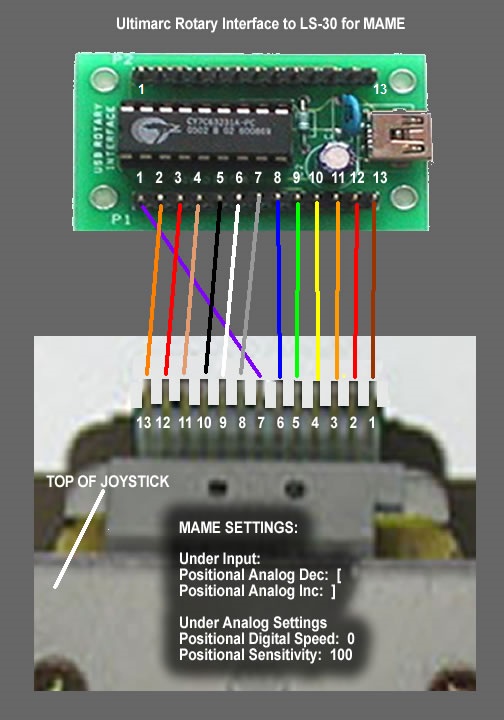
After finally finishing (painting) the Z-Cade, I completely went through the internals and brought everything up to date. I upgraded the OS to Win 10, upgraded the Mainboard, CPU, Hard Drives, Video Card, PS, Amp, Marquee Light, Coin Return Lights, Keyboard Controllers, Frontend, Roms and much more. Below are links to all the various sites that I used to get all this done.
Frontend
Hyperspin/MAME on 15hz k7000 arcade CRT 240p
Bigbox - Multiple keyboard buttons for same command
BIgBox Keyboard Controls & Joypad Mapping
Big Box - Launch on Startup Catch 22...
LaunchBox / Big Box
BigBox on computer start up
Launchbox vs All Other Arcade Front Ends
LaunchBox Premium (Big Box) review: Is it worth it
LaunchBox Big Box 6.0 Beta 6 - New Platforms Wheel (like Hyperspin) and CoverFlow Views
MAME: how to update it in LaunchBox?
Getting Launchbox to load different IPAC2 configurations
Input
How to Interface SNK LK30 Joysticks in the year 2019
Controls Interfaces - USB Compatible Gamepad / Joy Style (GroovyGameGear)
Arduino Rotary Joystick to USB: MAME Interface for 13 Pin Header
Rotary Joystick to USB: MAME Interface for 13 Pin Header (Youtube Video)
GP-Wiz40 ECO USB Compatible Input Interface with Rotary Support
GP WIZ40-----I'm stuck----NOOB!
Rotary Joystick to MAME Interface with Arduino - SNK LS30 on Retropie
Rotary Joystick in MAME
Seimitsu LS-30 Joystick - Full Disassembly
Disasembled Seimitsu LS-30 - SNK Rotary Joystick - PICS
New ControllerRemap utility
Interactive Panel Designer
I-PAC4
WinIPAC Interactive Panel Designer
WinIPAC V2 Configuration Utility for I-PAC
WinIPAC Version 2 Download
WinIPAC Shift Help
Interactive Panel Designer
Winipac failing to program, plz help
LS-30 harness male connector
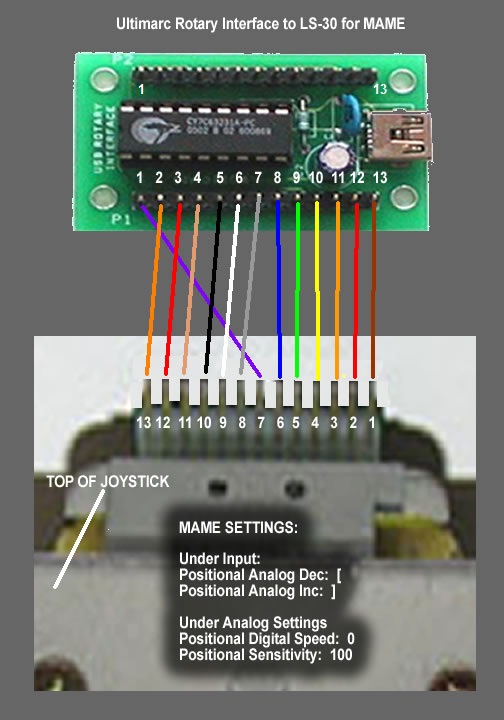
Ultimarc Rotary Interface to LS-30 for MAME
Cabinet
Game On Grafix
Building your own Arcade Cabinet for Geeks - Part 5 - Paint and Art
Etsy Arcade Vinyl
Emulators - MAME
Windows-Specific Commandline Options
Can MAME emulate 4 ways joystick?
Joystick Mapping in MAME
MAME Default Keyboard Controls
MAME Sets & Datfiles
Demystifying MAME ROMS
GroovyMAME
GroovyMame Setup on Windows10.with CRT Emudriver 2.0/VmMaker!
GroovyMAME Releases
Emulators - Daphne
Daphne (Laser Disk) Emulator - LaunchBox Tutorials
OS - Windows 10
2 ways to enable auto login in Windows 10/11
bsetshell - set Windows shell
The Complete Guide to Creating Symbolic Links (aka Symlinks) on Windows
SilentLaunch a simple Windows Shell replacement for HTPC
Shell Launcher
Monitor/GPU
The Wells-Gardner D9200 Arcade Monitor
Arcade Monitors and MAME
New Build - Bought ArcadeVGA (Wrong decision?)
Soft-15KHz - slim new tool for 15KHz on normal vga cards
Switchres: modeline generator engine
ArcadeVGA 5000 Card PCIe
ArcadeVGA Drivers
ArcadeOS / ArcadeVGA Resolution Question
CRT Emudriver 2.0 and WG D9400 15khz-38khz multisync
Installing CRT Emudriver 2.0 - HD 4350 - Windows 7 - super resolutions
Installing CRT Emudriver 2.0 - HD 5450 - Windows 7 - super resolutions
Installing CRT Emudriver 2.0 - HD 5450 - Windows 7 - super resolutions (on strav.net to fix broken images)
New CRT Emudriver/VMMaker/Arcade OSD download, documentation and discussion site
CRT Emudriver 2.0 - Download thread
Calamity's application software
Center image on x-axis (crtemudriver, RetroArch & super resolutions)
Switchres not functioning as expected